Design & Engineering Lead
September 2026
Overview & Problem Statement
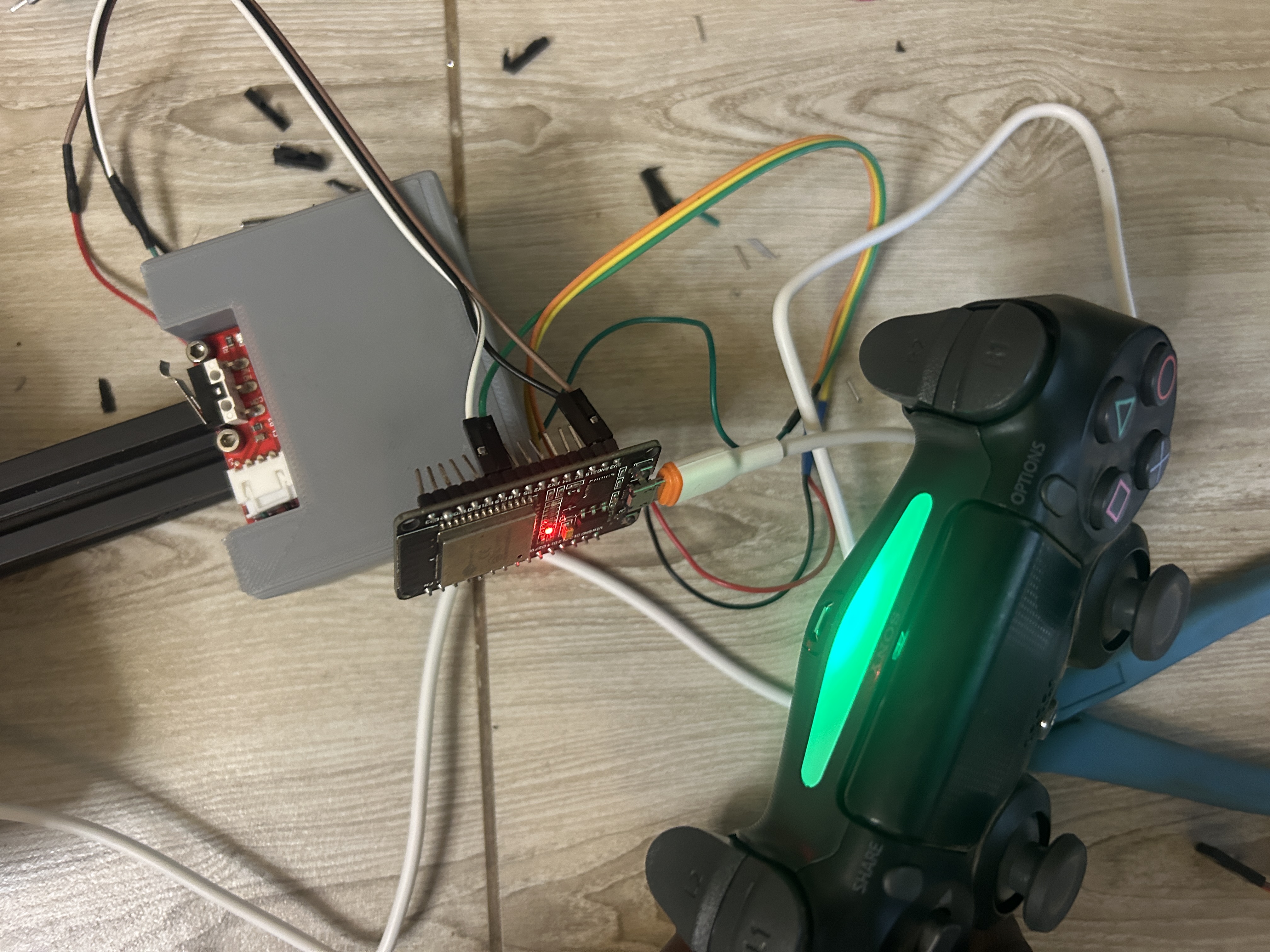
BluePad32 turns the ESP32 into a Bluetooth host that can pair directly with a PS4, PS5, Xbox, or Switch controller; no separate Bluetooth module is needed, since it uses the ESP32's built-in radio. To pair a PS4 controller specifically, hold the Share and PS buttons together until the light bar flashes rapidly.
System Architecture & Technical Approach
Pairing accommodates rumble feedback on every button press and logging that tracks how many times each button has been pressed.
Hardware & Software Implementation
// ESP32 + PS4 Controller via Bluepad32 — pairing, button reading,
// vibration feedback, and click logging

#include <Bluepad32.h>

// Button bitmasks (Bluepad32's PS4 mapping)
#define BUTTON_CROSS     0x0001
#define BUTTON_CIRCLE    0x0002
#define BUTTON_SQUARE    0x0004
#define BUTTON_TRIANGLE  0x0008
#define BUTTON_L1        0x0010
#define BUTTON_R1        0x0020
#define BUTTON_L3        0x0040
#define BUTTON_R3        0x0080

#define ANALOG_DEADZONE  30   // ignore small stick drift near center

GamepadPtr myGamepad = nullptr;
bool controllerConnected = false;

// One struct per tracked button — bundles its bitmask, a human-readable
// name for logging, its previous pressed/released state, a running click
// count, and the timestamp of its last press.
struct ButtonTracker {
  uint32_t mask;
  const char* name;
  bool wasPressed;
  unsigned long pressCount;
  unsigned long lastPressTime;
};

ButtonTracker buttons[] = {
  { BUTTON_CROSS,    "Cross",    false, 0, 0 },
  { BUTTON_CIRCLE,   "Circle",   false, 0, 0 },
  { BUTTON_SQUARE,   "Square",   false, 0, 0 },
  { BUTTON_TRIANGLE, "Triangle", false, 0, 0 },
  { BUTTON_L1,       "L1",       false, 0, 0 },
  { BUTTON_R1,       "R1",       false, 0, 0 },
  { BUTTON_L3,       "L3",       false, 0, 0 },
  { BUTTON_R3,       "R3",       false, 0, 0 },
};
const int NUM_BUTTONS = sizeof(buttons) / sizeof(buttons[0]);

void onConnectedGamepad(GamepadPtr gp) {
  if (myGamepad == nullptr) {
    Serial.println("PS4 controller connected!");
    myGamepad = gp;
    controllerConnected = true;

    gp->setColorLED(0, 255, 0);
    vibrate(0x80, 0x40, 200); // confirmation buzz on connect
  }
}

void onDisconnectedGamepad(GamepadPtr gp) {
  if (myGamepad == gp) {
    Serial.println("PS4 controller disconnected.");
    myGamepad = nullptr;
    controllerConnected = false;
  }
}

// Centralized vibration helper — every button handler calls this instead
// of repeating the rumble-then-delay-then-stop pattern inline
void vibrate(uint8_t strongMotor, uint8_t weakMotor, int durationMs) {
  if (!myGamepad) return;
  myGamepad->setRumble(strongMotor, weakMotor);
  delay(durationMs);
  myGamepad->setRumble(0, 0);
}

void setup() {
  Serial.begin(115200);
  delay(2000);

  Serial.println("Initializing Bluepad32...");
  BP32.setup(&onConnectedGamepad, &onDisconnectedGamepad);
  BP32.forgetBluetoothKeys();

  Serial.println("Hold SHARE + PS until the light bar flashes rapidly to pair.");
  Serial.println("Button | Press Count | Time Since Boot (ms)");
}

void loop() {
  bool dataUpdated = BP32.update();

  if (dataUpdated && controllerConnected && myGamepad != nullptr) {
    processButtons();
  }

  delay(1);
}

void processButtons() {
  uint32_t currentState = myGamepad->buttons();

  for (int i = 0; i < NUM_BUTTONS; i++) {
    bool isPressed = currentState & buttons[i].mask;

    // Rising edge — button just went from not-pressed to pressed
    if (isPressed && !buttons[i].wasPressed) {
      buttons[i].wasPressed = true;
      buttons[i].pressCount++;
      buttons[i].lastPressTime = millis();

      logButtonPress(buttons[i]);
      vibrate(0x80, 0x40, 100); // every press gets a short buzz
    }
    // Falling edge — button released, reset for next press
    else if (!isPressed && buttons[i].wasPressed) {
      buttons[i].wasPressed = false;
    }
  }
}

void logButtonPress(const ButtonTracker &btn) {
  Serial.print(btn.name);
  Serial.print(" | Press #");
  Serial.print(btn.pressCount);
  Serial.print(" | t=");
  Serial.print(btn.lastPressTime);
  Serial.println("ms");
}
Key Challenges & Technical Trade-offs
Logging every press to Serial with delay(100) for the vibration inside the same loop iteration briefly blocks other button reads, for a build with many simultaneous button presses expected, this would need to move to a non-blocking timer instead of a delay()
Results, Impact & Performance Metrics
Every tracked button now vibrates on press and logs its name, running press count, and timestamp to Serial.